Revenue Management
Direct Bookings
Google Hotel Free Booking Links: A Setup Guide for Independent Hotels
8 min read
When someone searches your hotel on Google, they see a tidy little booking box: your property, the dates, and a list of places to book — Booking.com, Expedia, Hotels.com, each taking a 15–25% cut of every reservation they send you. What most independent hoteliers don't realize is that your own website can sit right there in that same list, for free — no ad spend, no commission, no bidding. Google calls these free booking links, and turning them on is one of the highest-return, lowest-effort things a small property can do. This guide walks through exactly what they are, what you need, and how to switch them on.
What are Google's free booking links?
Free booking links are exactly what they sound like: a link straight to your booking page, shown inside Google's hotel results alongside the OTAs — at no charge. When a traveler finds your hotel on Google Search or Google Maps and opens the booking module, they can see your direct rate and click through to book on your own site instead of an OTA.
The important word is free. This is not Google Hotel Ads (the paid, pay-per-click placements that appear at the top of the same module). Free booking links cost nothing to run: once you're connected, they turn on automatically, there's no campaign to manage, and Google takes no commission. You keep 100% of a booking that would otherwise have cost you a fifth of the room rate.
Ad vs. free link vs. OTA: how to read the Google booking box
Open the booking box for almost any hotel and you'll see three different kinds of listing stacked together. Once you can tell them apart, the whole thing makes sense. Here's a real example:
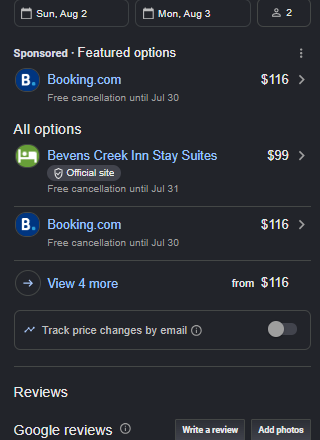 A real Google hotel booking box showing a "Sponsored · Featured options" ad from Booking.com at $116, and under "All options" the hotel's own "Official site" free booking link at $99 — cheaper than the OTA.
- "Sponsored · Featured options" — this top, highlighted row is a paid advertisement (a Google Hotel Ad). Whoever bids the most for that slot wins it, and pays Google per click — very often an OTA like Booking.com. In the example, that's Booking.com advertising at $116/night.
- "Official site" (under All options) — this is the free booking link: the hotel's own website, shown at no cost and zero commission. Google labels it "Official site" so travelers know they're booking direct. Here it's the property's direct rate of $99/night.
- The OTA rows — the other entries under All options (Booking.com, Expedia, and so on) are third-party listings that charge the hotel a commission on every booking. In the example, Booking.com again at $116.
💰 The takeaway: in this example the guest pays $99 on the hotel's official site versus $116 on Booking.com — cheaper for the guest and commission-free for the hotel. The free booking link wins on both sides of the transaction at once.
That's the entire case for free booking links in a single screenshot: your own site, sitting right beside the OTAs, often at a better price, and costing you nothing to appear. And notice that the "Official site" link shows up without paying for the ad on top — the paid placement and the free link are separate. You earn the free one just by having a connected, compliant rate feed.
Why they matter for independent hotels
For a small or independent property, this is close to found money:
- They're commission-free. A $150 direct booking is worth about $22–38 more to you than the same booking through an OTA — money that goes straight to your bottom line, not a distribution fee.
- They level the playing field. Big OTAs have always outspent you on Google. Free booking links give your own site a seat at the same table, right when the guest is ready to book.
- They're incremental. Many travelers still book through OTAs, but a meaningful share prefer to book direct if it's easy and the price is fair. Free links capture exactly those guests without cannibalizing anything.
- They're basically automatic once set up. Unlike an ad campaign, there's nothing to babysit day to day.
The catch is that you can't just flip a switch on your website — Google needs to receive your live rates and availability through an approved connection. That's the one piece worth understanding.
What you need to be eligible
Google's requirements for free booking links are straightforward. You need:
- A Google presence for your property. Your hotel has to exist on Google as a place — a claimed Google Business Profile and a matched hotel listing — so it can appear in the hotel booking module at all.
- A connectivity partner. This is the crux. Google doesn't take rates directly from independents; it receives them through an integrated partner that sends your availability and pricing in real time. That partner is your PMS, channel manager, or booking engine — as long as it's integrated with Google Hotel Center. (More on this below.)
- A working booking engine and landing page. The link has to send the traveler to a functional page on your site where they can actually complete the booking for the dates and rate shown.
- Rate, tax, and fee compliance. The price Google shows has to match what the guest pays, with taxes and fees handled per Google's rules. Bait-and-switch pricing gets you removed.
If you're already running Google Hotel Ads through a partner, good news: participating properties with live rates and a landing page are automatically eligible for free links too.
How to set them up
Here's the practical sequence for an independent property:
- Claim and complete your Google Business Profile. Make sure your hotel is listed and verified on Google, with accurate name, address, and category. This is what makes the booking module appear for your property in the first place.
- Get a connectivity partner that integrates with Google. This is the step that actually feeds your rates to Google. You don't build this yourself — you use a booking engine or PMS that already has the Google Hotel Center integration. If your current system offers it, ask them to enable Google free booking links for your property.
- Connect your live rates and availability. Through that partner, your real-time pricing and open dates flow into Google's Hotel Center feed. Confirm your rate plans, taxes, and fees are configured correctly so the displayed price matches checkout.
- Point the link at your booking engine. The free link should land guests on your own booking page, pre-loaded with the right dates, ready to complete. Test it end to end on both desktop and mobile.
- Let them activate — then watch the reports. Once the feed is live and compliant, free booking links switch on automatically. You can track impressions and clicks in Google Hotel Center → Reports, where free-link performance is broken out separately from paid.
That's it. There's no bidding, no budget, and no ongoing campaign management — the work is almost entirely in step 2, getting a partner that handles the connection.
How to actually get the clicks
Being eligible is not the same as being chosen. Once your link is live, a few things decide whether travelers click it over the OTAs:
- Keep rate parity — or beat it. If Booking.com is showing a lower price than your direct rate, the guest clicks Booking.com. At a minimum, match your OTA rates; ideally, make your direct rate a touch better (a small "book direct" discount or a perk like free parking or late checkout). You can do this because you're not paying commission.
- Make the landing page fast and mobile-first. Most of these searches happen on phones. A slow or clunky booking flow loses the guest even after they've clicked. Test the whole path on a phone.
- Complete your Google profile. Photos, amenities, accurate policies, and strong reviews all make your listing more clickable and more trusted.
- Get your reviews up. Rating and review volume influence how prominently your property surfaces in Google's hotel results — the same customer reviews that help everywhere else help here too.
Free booking links vs. Hotel Ads: what's the difference?
It's easy to confuse the two because they live in the same booking box:
- Free booking links are unpaid. You appear organically, pay nothing per click, and Google takes no commission. Every property with a compliant, connected feed can get them.
- Google Hotel Ads are paid placements at the top of the module. You bid for position and pay per click (or per booking/commission, depending on the model). They can drive more volume, but they cost money.
The smart play for a budget-conscious independent: turn on free booking links first — they're free and incremental — and only consider Hotel Ads later if you want to buy additional visibility on top.
Frequently asked questions
Do free booking links cost anything? No. There's no fee to appear and no commission on the bookings. The only "cost" is having a connectivity partner (your booking engine or PMS) that supports the Google integration.
Can I set this up without a booking engine? Not really. Google needs live rates and a page where the guest can complete the booking. A direct booking engine is what supplies both, and the connectivity partner is what feeds your rates to Google.
How long until they show up? Once your rate feed is live and compliant, free links generally activate automatically within a short window. You'll see performance appear in Hotel Center's Reports.
Will this compete with my OTA listings? It sits next to them, giving guests a direct option. It doesn't remove your OTA listings — it just stops the OTA from being the only choice at the moment of booking.
The bottom line
Free booking links are one of the rare marketing moves with no downside: no cost, no commission, and no ongoing management, in exchange for a direct-booking channel that sits shoulder-to-shoulder with the OTAs at the exact moment a guest decides to book. The only real prerequisite is a booking engine and connectivity partner that plug into Google for you.
That's built into InnSyst. Our commission-free direct booking engine includes Google Hotel Links integration, so your live rates flow to Google and your free booking links land guests on your own booking page — no separate connectivity vendor, no per-booking fee. If you're tired of handing a fifth of every reservation to the OTAs, this is one of the fastest ways to start winning bookings back. Book a quick demo and we'll get your property connected.
For Google's official requirements, see About hotel free booking links in the Hotel Center Help Center.
Ready to try InnSyst?
See how InnSyst can streamline your property operations. Book a free demo and get set up in under an hour.
Book a DemoNo credit card required. Free setup and onboarding included.